
Blog
How to Transcribe Audio to Text: Free and AI Methods (2026)
 Resalt Published
An hour of recorder audio, a messenger interview or a lecture on your phone: replaying it takes as long as the recording itself. Transcribing audio to text solves this in minutes: a neural network turns speech into a document you can read, search and quote.
This guide covers three ways to get text from a recording. The fastest one is an AI transcription service: upload a file and get a transcript. The second is free tools from Google, Microsoft and Apple, plus the Audacity and Whisper setup for those willing to tinker. The third is manual transcription, which still makes sense in a few cases. At the end: format and limit tables, an accuracy breakdown and tips for specific tasks, from interviews to messenger voice notes.
What Is Audio Transcription?
Audio transcription (also called speech-to-text) is the process of converting spoken language from an audio or video recording into a written document. The underlying technology is automatic speech recognition, or ASR: a model analyzes the sound wave, recognizes words and assembles them into coherent text.
Modern tools do far more than “words separated by spaces”:
- Punctuation and paragraphs. The model adds commas and periods, so the text reads like a normal document.
- Speaker separation. Diarization assigns lines to the participants in the recording.
- Timestamps. Each fragment is linked to a point in the audio: click a line to jump to that moment.
- Export. The finished text downloads as documents, plain text or subtitles.
If you are choosing a specific service from dozens of options, we cover that in a separate article. Here the focus is different: how to actually get text from a recording yourself, with any budget, including zero.
How to Transcribe Audio to Text: 4 Steps
Whatever tool you pick, the process is the same. The differences are in the details: model quality for your language, limits and the convenience of the editor.
- Pick your method. Base this on your budget, recording volume and required accuracy. A free tool covers a one-off task; regular work is easier in an AI service.
- Upload your file or start recording. Drag the ready audio or video into the service window, or speak into the microphone if the tool works as a live dictation app.
- Select the language. Choose the language spoken in the recording so the service uses the right recognition model. Most AI services detect it automatically.
- Review the transcript. Read the result, fix names and terminology, save the document in the format you need. Even the best models make mistakes, so a final human pass is still on you.
Method 1. AI Transcription Software: The Fastest Route
Uploading a file to a dedicated service is the simplest way to get text. An hour of audio is processed in minutes and comes back with punctuation, speaker labels and timestamps. Most services offer a free tier with a limited number of uploads, so the first transcript costs nothing.
Here is the process using Resalt as an example. Other services in this category work similarly; what differs are the limits and the quality of the model for your language.
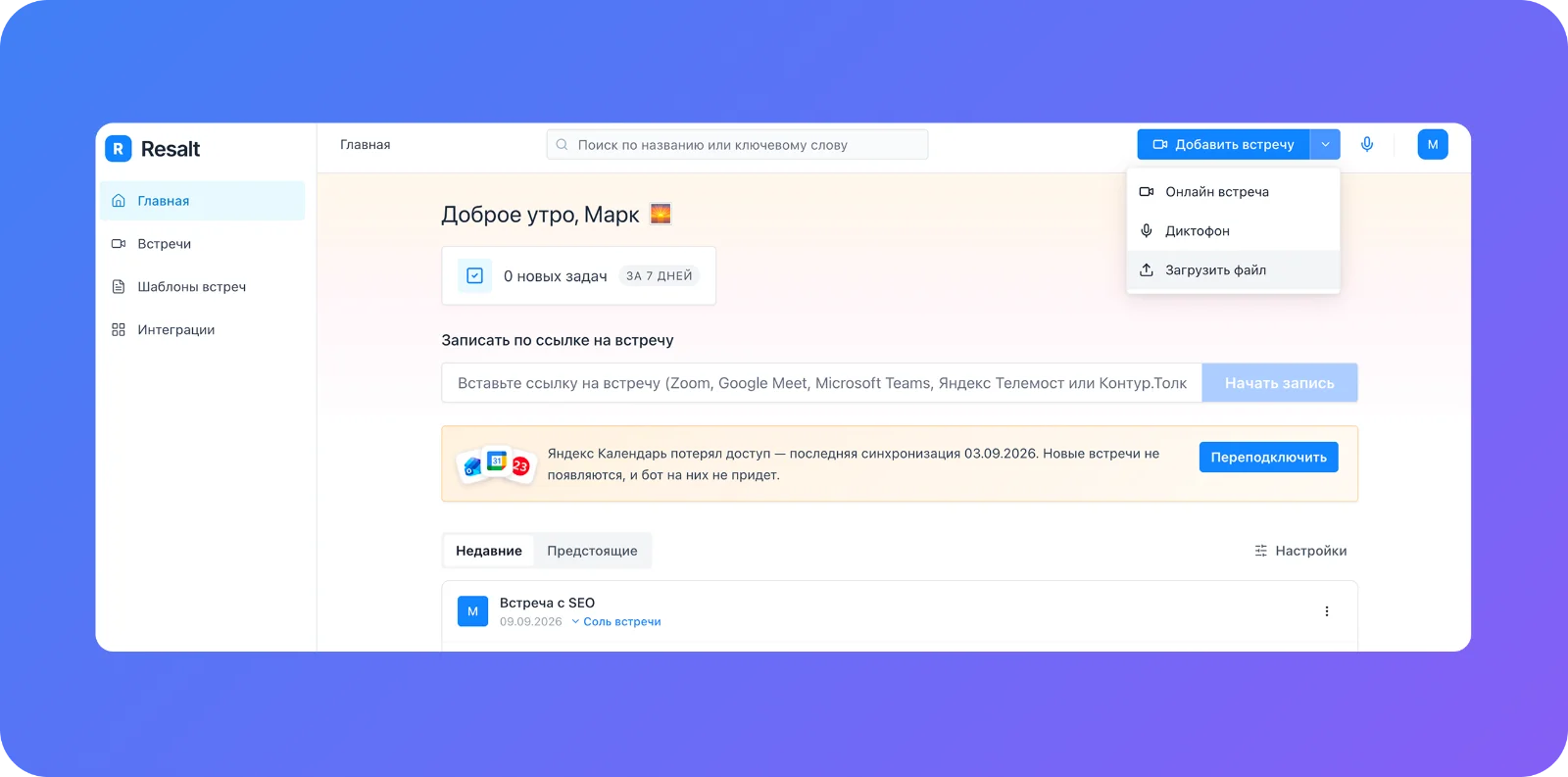
Step 1. Sign in and open the upload screen. Click the upload button in your dashboard.
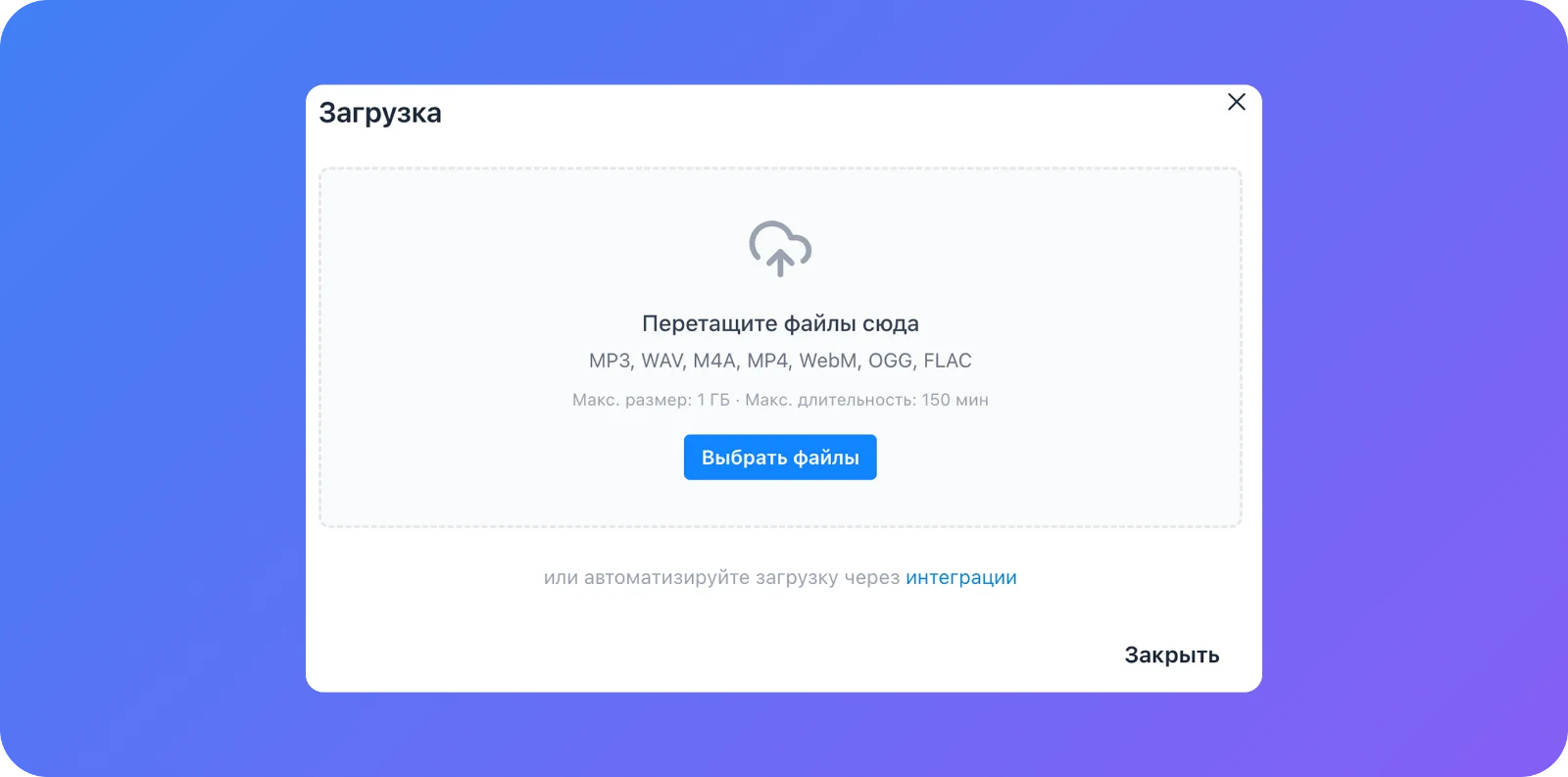
Step 2. Drag your audio or video into the box. Common formats work: MP3, WAV, M4A, MP4. Resalt accepts files up to 1 GB and 150 minutes of audio, on every plan.
Step 3. Wait for processing. Before recognition the service cleans the audio from noise, which improves accuracy even on “recorded on the street” files. An hour of audio takes a few minutes.
Step 4. Review the text in the editor. The transcript opens with timestamps and speaker labels. Clicking a line plays the matching audio fragment, which makes checking tricky spots easy.
Step 5. Download the result. The text exports to common document formats and Markdown; meeting notes come out as a structured document with decisions and action items.
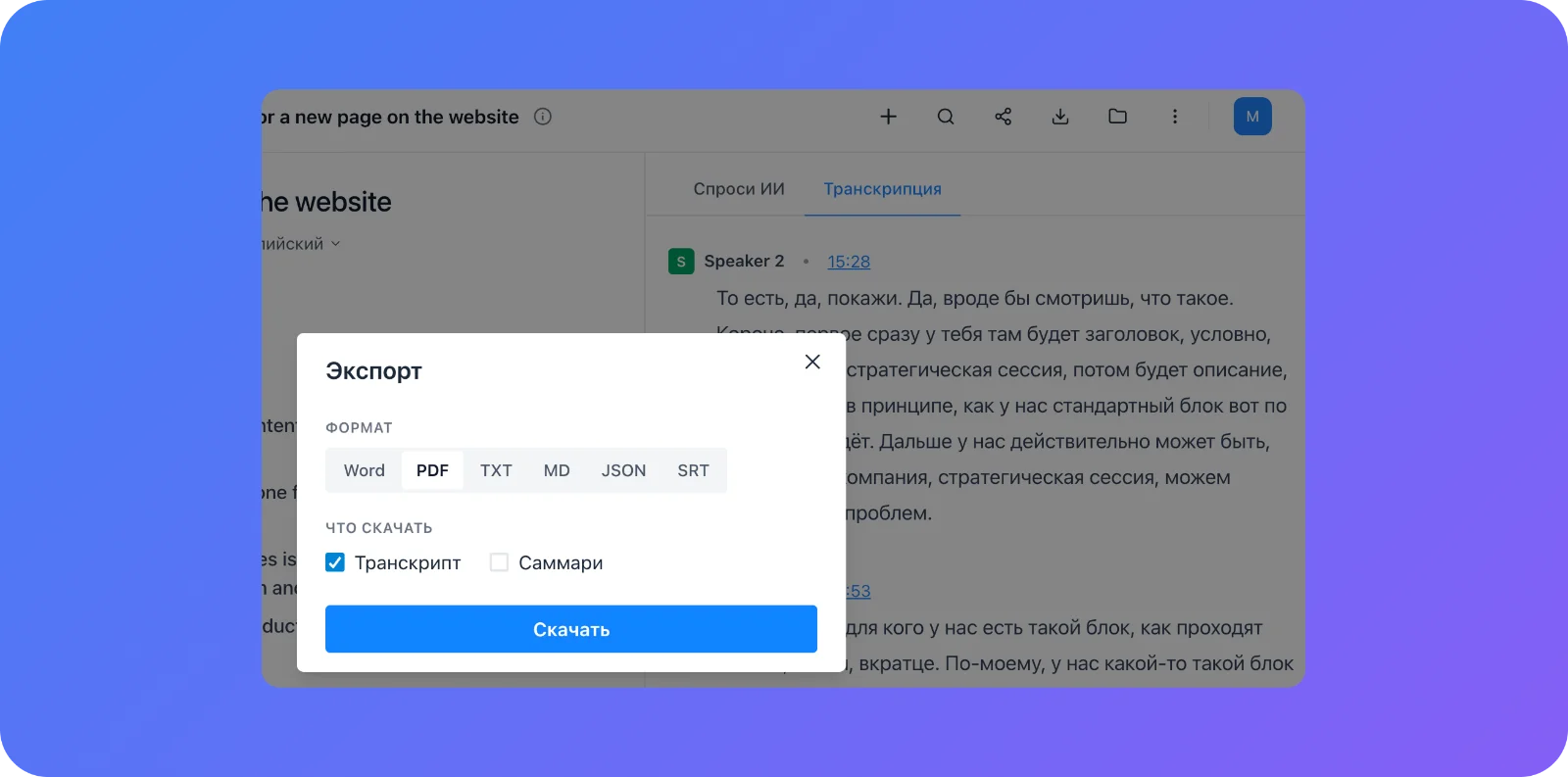
Beyond files, services in this category can join your meetings with a bot, transcribe them live and automatically prepare a summary and a task list afterwards. Some also connect to AI agents through an MCP server, so the transcript becomes searchable from your assistant. If you already have a recording, the upload alone is enough.
Method 2. Free Tools: Google, Microsoft, Apple and Whisper
If you would rather not pay yet, there are several honest free options. Each has its boundaries: some cannot upload files, some lack your language, some cap you at a few hundred minutes a month. Here is how they compare.
Google Docs: Voice Typing
Free dictation inside the browser. Open a Google Docs document, choose Tools → Voice typing and speak into the microphone: text appears in the document as you talk. Russian is supported.
The main limitation: the tool only works in real time. It cannot accept an existing recording, so there is no way to hand it a file from a voice recorder. It suits quick voice notes, not transcribing finished audio.
Audacity + Whisper: Free, Offline and Unlimited
The most powerful free setup. Audacity is a free open-source audio editor. Through the OpenVINO AI plugin it runs OpenAI’s Whisper model right on your computer: no files leave the machine and there are no monthly caps. Whisper supports 99 languages, including Russian, and ranks among the best open models for Russian speech.
The price of “free” is setup: you install the program and the plugin, learn the settings, and processing is slow on a weak computer. This option fits technically confident users and anyone who needs privacy, since the file goes nowhere.
Microsoft Word Transcribe: For Microsoft 365 Subscribers
A built-in transcription feature in Word for Microsoft 365 subscribers. It uploads MP3, WAV, M4A and MP4 files and returns text with speaker labels and timestamps. According to Microsoft Learn, the limit is 300 minutes of uploaded audio per month for business and enterprise plans, and 200 minutes for Microsoft 365 Personal and Family.
The limits: no subscription, no feature; extra minutes cannot be purchased; no summary or task extraction. It handles Russian, but independent tests from 2026 show noticeably lower accuracy than Whisper-based models.
Apple Voice Memos: Transcribing on iPhone
Starting with iOS 18, the Voice Memos app on iPhone 12 and newer transcribes recordings on the device itself, for free and without sending audio to the cloud.
The limits are strict and worth knowing before you start. According to Apple Support, transcription covers only ten languages: English, Spanish, Portuguese, Italian, French, German, Japanese, Korean and both variants of Chinese. Russian is not on the list. The text also comes without speaker labels, and export is plain text only.
Google Live Transcribe: Captions for Live Conversation
A free Google app for Android that turns live speech into on-screen text in real time. Per Google, it supports more than 70 languages and dialects, including Russian. History is kept for up to three days.
This is a tool for face-to-face conversation, not files: you cannot upload a recording, it does not separate speakers, and saving the text means manually copying it into another document. There is no iOS version.
Method 3. Manual Transcription: When It Still Makes Sense
Manual transcription means pausing, rewinding and typing out every word. One hour of audio takes about four hours of work, longer for recordings with heavy noise or many speakers. Professional services charge per audio minute, so a long interview becomes a real budget line.
At that price, manual work stays reasonable in three cases: the file is so sensitive it must not touch any cloud; the recording is under a minute; or you need full control over the formatting of a quote. For everything else, automation is faster and cheaper, and the final proofreading takes minutes instead of hours.
Which Audio Formats Can You Transcribe?
The format decides whether your tool accepts the file at all. The good news: almost every service handles four formats that cover the vast majority of recordings: MP3, WAV, M4A and MP4. Many also accept AAC, FLAC and OGG.
| Format | Where you usually get it | What it means for transcription |
|---|---|---|
| MP3 | Podcasts, voice recorders, downloaded audio | Small size, fast upload, works in any tool |
| WAV | Studio and professional recording | Large file, but clean sound means better accuracy |
| M4A | iPhone Voice Memos, Apple devices | Standard export from voice memo apps, good quality at moderate size |
| MP4 | Zoom and Meet recordings, webinars, saved video | Video: the service extracts the audio track automatically |
If your recording is in a rare format, the easiest path is converting it to MP3 with a free converter and uploading that.
Free Tools vs AI Services: A Comparison
A summary of the limits helps you pick a method without mid-month surprises.
| Tool / Method | Cost | Best For | Key Limitation |
|---|---|---|---|
| Google Docs Voice Typing | Free | Live dictation while speaking in real time | You have to speak live; you can’t upload existing files |
| Microsoft Word Transcribe | Included with Microsoft 365 | People who already use Microsoft 365 for work | Capped at 300 minutes/month (200 on Personal/Family plans) |
| Apple Voice Memos | Free | iPhone users who want on-the-go transcripts | Requires an iPhone 12 or later running iOS 18 or later; availability varies by language and region |
| Audacity + Whisper | Free | Tech-savvy users who want unlimited, private, offline transcription | Setup takes some technical know-how, and it can be slow on older machines |
| AI Transcription Software (e.g., Resalt) | Free tier or paid plans | Business meetings, teams, and accuracy-critical work | Higher limits and advanced features require a paid plan |
How Accurate Is Audio-to-Text Transcription?
Accuracy is measured as the share of misrecognized words: the cleaner the recording, the better the result for any tool. Stated numbers vary between services. According to Fireflies, the service reaches 99% accuracy on English speech and 95% on its other 100+ supported languages. Otter states 85–90%, Notta claims up to 98.86% across 58 languages, Happy Scribe claims up to 96% on its automated tier. These figures are hard to compare directly: every service tests on its own samples.
In practice, the recording, not the marketing, decides the outcome:
- Background noise. Air conditioners, traffic and cafe chatter drown out speech.
- Cross-talk. When speakers interrupt each other, models lose phrases.
- Accents and dialects. Strong regional pronunciation lowers quality for any model.
- A poor microphone or a distant speaker. “Phone lying on the table at the far end of the room” is the worst-case recording.
The takeaway is simple: a quiet room and a close microphone produce good text in any decent tool. For Russian speech, check the model specifically: services tuned for English often underperform on Russian audio.
Choosing a Method for Your Task
Interviews. Journalists need exact quotes. The best fit is an AI service with an editor and timestamps, so a doubtful passage can be verified in one click. Keep the recorder close to the guest.
Podcasts. Episode text turns into show notes, social quotes and material for search engines that cannot “listen” to audio. Any service with file upload and export works.
Meetings. If you already have a recording, upload it to a service that also prepares a summary and a task list: that is a ready-made protocol. This is where the CIS-specific criteria matter: Russian model quality, ruble pricing and data residency under Federal Law 152-FZ for teams working with Russian clients. We covered how this automation works in our meeting transcription guide.
Lectures and talks. Long continuous speech from one speaker is easy for almost any tool. The main thing is recording from a spot close to the speakers.
Voice messages. Save a voice note from Telegram or WhatsApp as a file (both messengers offer “Save” or “Share” in the menu) and upload it to a service. This is how short voice messages become text for notes or emails.
Research. Qualitative analysis needs text search, quotes and export. Choose a service that downloads documents and Markdown. Transcripts of user interviews also feed directly into research repositories and analysis tools, which is where clean exports stop being a convenience and become a requirement.
How to Transcribe Audio to Text in Resalt for Free
Resalt handles meeting recordings, its own voice recorder and uploaded files. No card is needed to start:
- Upload audio or video up to 1 GB and 150 minutes of recording. The free plan includes 5 uploads.
- Get Russian text: the service cleans the audio from noise before recognition, which improves accuracy.
- Review the result in an editor with timestamps and speaker labels, then download the text or the summary, including a Markdown export.
For regular work, the Pro plan at 1,900 rubles per month removes the upload limit and adds unlimited AI summaries. Data is stored with AES-256 encryption, the service complies with Russian Federal Law 152-FZ (alongside GDPR-grade practices for international teams), and payment is in rubles.
“Transcribe audio for free” → resalt.app
The Bottom Line
Text from a recording can be obtained for free, with AI, or by hand. Free tools cover one-off tasks: dictation in Google Docs, the offline Audacity and Whisper setup, on-device transcription on an iPhone. AI services like Resalt save time on regular work: upload a file, get Russian text with timestamps and a summary. Manual transcription remains the last resort for especially sensitive files. And accuracy is almost always decided before you pick a tool: a quiet room and a close microphone produce good text in any decent service.
Frequently asked questions
Can I transcribe audio to text for free, without limits?
Yes, there are two honest paths. The Audacity and Whisper setup transcribes recordings for free with no caps, right on your computer, but it needs installation and configuration. Online services give free tiers with limits: for example, Resalt includes 5 uploads on its free plan.
How long does it take to transcribe one hour of audio?
An AI service processes an hour of audio in a few minutes, and proofreading the text takes another 10–15. Manual transcription of the same hour takes about four hours, longer with poor sound or multiple speakers.
Can ChatGPT transcribe audio files?
Yes, but with strict limits: according to Fireflies' 2026 guide, free users get about three file uploads per day. For regular work with recordings, a dedicated transcription service with an editor and export is more convenient.
How do I transcribe a voice message from Telegram or WhatsApp?
Save the voice note as a file: in Telegram use "Save to Downloads" or "Share", in WhatsApp use "Export chat" with media attached. Then upload the file to a transcription service.
Which transcription method is the most accurate?
With a clean recording in a quiet room, the gap between good AI services is small. The result depends more on the microphone and noise than on the tool. For Russian speech, choose a service with a strong Russian model: that is where quality varies the most between services.
Which audio file formats can be transcribed?
The universal four: MP3, WAV, M4A and MP4. They cover voice recorders, iPhone voice memos, podcasts and meeting video recordings. Many services also accept AAC, FLAC and OGG, and export ready subtitles in SRT.